Android Plataforma - Part 14: Opting in to experimental Kotlin compiler features
By Rodrigo Sicarelli 3 min read Updated
In the last article we extended our platform with the ability to declare JVM modules.
In this article we’ll go a step further and configure compilation options so that each module can “opt in” to experimental features.
Opt-In in Kotlin
One of the practices teams adopt when designing an API safely is using an “opt-in” system for specific features or APIs.
The RequiresOptIn annotation
The RequiresOptIn annotation indicates that an annotation class is a marker for an API that requires an explicit opt-in.
When you run into an API annotated with a marker that is itself annotated with RequiresOptIn, the compiler forces you to explicitly agree to use that API.
@Target(ANNOTATION_CLASS)
@Retention(BINARY)
@SinceKotlin("1.3")
public annotation class RequiresOptIn(
    val message: String = "",
    val level: Level = Level.ERROR
) {
    public enum class Level {
        WARNING,
        ERROR,
    }
}
Contagiousness
APIs annotated with markers that require opt-in are “contagious”. Any use of or reference to that API in other declarations will also require an opt-in.
For example:
@UnstableApi
class Unstable

@OptIn(UnstableApi::class)
fun foo(): Unstable = Unstable()
When you try to use the foo function, you’ll be warned that you need to opt in to the unstable API.
The OptIn annotation
The OptIn annotation lets us declare that we’re aware of and accept the risks involved in using a marked API.
@Target(
    CLASS, PROPERTY, LOCAL_VARIABLE, VALUE_PARAMETER, CONSTRUCTOR, FUNCTION, PROPERTY_GETTER, PROPERTY_SETTER, EXPRESSION, FILE, TYPEALIAS
)
@Retention(SOURCE)
@SinceKotlin("1.3")
public annotation class OptIn(
    vararg val markerClass: KClass<out Annotation>
)
Using experimental APIs
To illustrate everything we’ve discussed, let’s use a Material3 component that’s annotated with RequiresOptIn:
import androidx.compose.material3.Card
..

@Composable
fun HomeScreen() {
    Surface(
        modifier = Modifier.fillMaxSize(),
        color = MaterialTheme.colorScheme.background
    ) {
        //The IDE will show an error/warning on this line
        Card(
            modifier = Modifier
                .fillMaxWidth()
                .wrapContentHeight()
                .padding(all = 16.dp),
            onClick = { },
            content = {
                DetailsScreen()
            }
        )
    }
}
Notice the error/warning that shows up on screen:
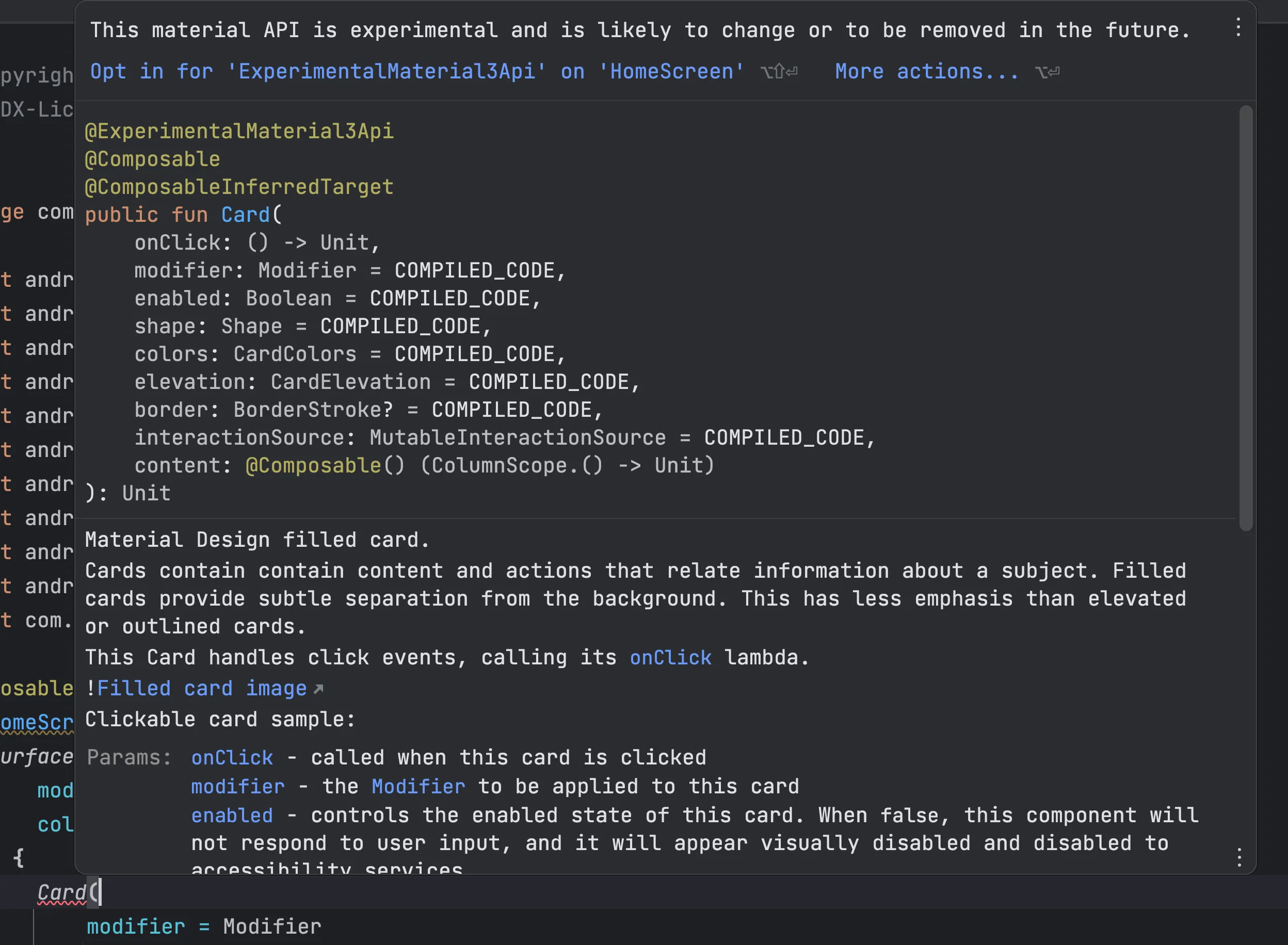
To fix this error, we simply add the OptIn to our composable:
@OptIn(ExperimentalMaterial3Api::class)
@Composable
fun HomeScreen() {
   ..
}
For specific situations, this approach works fine. But consider functions that are used frequently, like Flow.flatMapConcat:
@OptIn(FlowPreview::class)
fun main() {
    flowOf(null)
        .flatMapConcat { flowOf(true) }
}
Repeating this declaration at every use can get tedious, especially in large codebases.
Customizing our Kotlin compilation to avoid the need for OptIn
The good news is that we can configure our applyKotlinOptions() to opt in to the features we need.
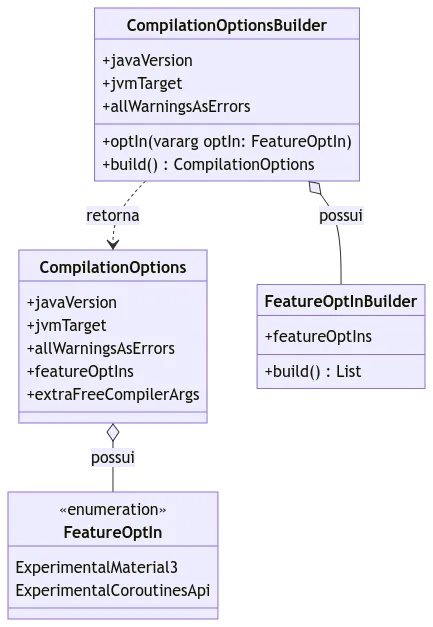
1 - We’ll update our CompilationOptions model to accept a list of FeatureOptIn:
data class CompilationOptions(
    ..
    val featureOptIns: List<FeatureOptIn>,
) {

    val extraFreeCompilerArgs: List<String>
        get() = featureOptIns.map { "-opt-in=${it.flag}" }

    enum class FeatureOptIn(val flag: String) {
        ExperimentalMaterial3("androidx.compose.material3.ExperimentalMaterial3Api"),
        ExperimentalCoroutinesApi(flag = "kotlinx.coroutines.ExperimentalCoroutinesApi"),
    }
}

class CompilationOptionsBuilder {

    ..
    private val featureOptInsBuilder = FeatureOptInBuilder()

    fun optIn(vararg optIn: FeatureOptIn) {
        featureOptInsBuilder.apply {
            featureOptIns = optIn.toList()
        }
    }

    internal fun build(): CompilationOptions = CompilationOptions(
        ..
        featureOptIns = featureOptInsBuilder.build()
    )
}

class FeatureOptInBuilder {

    var featureOptIns: List<FeatureOptIn> = mutableListOf()

    internal fun build(): List<FeatureOptIn> = featureOptIns.toList()
}
2 - Go to the fun applyKotlinOptions() function and update its usage:
internal fun Project.applyKotlinOptions(compilationOptions: CompilationOptions) {
    tasks.withType<KotlinCompile>().configureEach {
        kotlinOptions {
            allWarningsAsErrors = compilationOptions.allWarningsAsErrors
            jvmTarget = compilationOptions.jvmTarget
            compilerOptions.freeCompilerArgs.addAll(compilationOptions.extraFreeCompilerArgs)
        }
    }
}
3 - Sync the project. Then go to the module that’s using these features and use the new DSL:
import com.rsicarelli.kplatform.androidLibrary
import com.rsicarelli.kplatform.options.CompilationOptions.FeatureOptIn.ExperimentalCoroutinesApi
import com.rsicarelli.kplatform.options.CompilationOptions.FeatureOptIn.ExperimentalMaterial3

plugins {
    id(libs.plugins.android.library.get().pluginId)
    kotlin("android")
}

androidLibrary(
    compilationOptionsBuilder = {
        optIn(ExperimentalCoroutinesApi, ExperimentalMaterial3)
    }
)

dependencies {
    ..
}
Success!
Now we can use the experimental Coroutines and Material3 features without having to add the OptIn annotation.
In the next article we’ll focus on code quality, introducing static analysis with Detekt and Spotless to help with auto-formatting, sticking to the project’s code style (.editorconfig).