Android Plataforma - Part 2: Starting the Project
By Rodrigo Sicarelli 1 min read Updated
In this post we explore a starter project, understand the challenges of maintaining build.gradle.kts files, and discover how Gradle Composite Builds can help along the way.
We’ll start from a simple project, generated from a default IntelliJ template, with a few modules added to it:
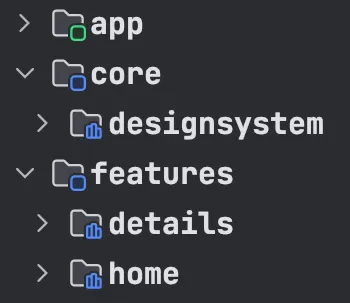
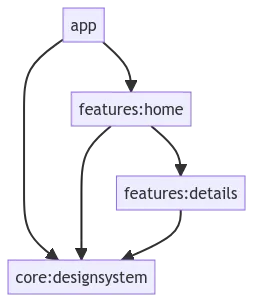
- app: Acts as the central entry point of the application, containing the MainActivity.
- core:designsystem: Defines the main visual elements, such as the project’s theme, colors, typography, and icons.
- features:home: Represents the first interaction screen, displaying the content from the details module.
- features:details: Shows a text message on the UI.
The problem to solve
Take a look at the Gradle files of each module:
- app/build.gradle.kts
- core/designsystem/build.gradle.kts
- features/home/build.gradle.kts
- features/details/build.gradle.kts
You can spot a redundancy here: even though the modules apply similar configuration through the android {} extension, their dependencies are different.
Our initial goal is to standardize these scripts so they can be reused and are easier to maintain.
Using Gradle Composite Builds
When you run into the challenge of managing and maintaining multiple Gradle modules, one effective solution is the Composite Builds feature. It lets us combine multiple independent builds into one, making it easier to standardize and reuse scripts.
In the next sections, we’ll dig deeper into how composite builds work, how to set them up, and how to integrate them into your existing project.