Android Plataforma - Part 9: Unifying the Application and Library extensions with the Common Extension
By Rodrigo Sicarelli 4 min read Updated
In the last post, we managed to extract the configuration logic for our library modules.
But we noticed there was a lot of code duplication, and no “source of truth” for crucial parts like SDK settings.
In this post, we’ll understand how to unify these two shared parts, talk about ApplicationExtension, LibraryExtension and CommonExtension, and end up with a function that applies the common configuration to any type of Android module.
Android Gradle Plugin (AGP) Extensions
In the Android development world, Google gives us a consistent and powerful DSL inside our build.gradle.kts files.
However, once we started using these extensions in our platform, we noticed there are several “small” features that, while subtle, have the power to reshape how we configure our modules.
ApplicationExtension
The gateway to Android development is the android { } extension in build.gradle.kts.
This extension is actually a representation of ApplicationExtension when the com.android.application plugin is applied.
ApplicationExtension is an Android Gradle Plugin-specific extension for configuring various aspects of an Android project.
On top of that, it inherits characteristics from other extensions, like CommonExtension, ApkExtension and TestedExtension, expanding its capabilities.
interface ApplicationExtension :
    CommonExtension<
            ApplicationBuildFeatures,
            ApplicationBuildType,
            ApplicationDefaultConfig,
            ApplicationProductFlavor,
            ApplicationAndroidResources>,
    ApkExtension,
    TestedExtension { }
LibraryExtension
When building Android libraries, the android extension takes on a different form.
It’s a representation of LibraryExtension when the com.android.library plugin is applied.
LibraryExtension is specific to the Android library plugin and provides ways to configure and customize an Android library, setting it apart from application projects.
Beyond that, it also inherits characteristics from CommonExtension and TestedExtension, exposing several configurations and options common to all types of Android projects.
interface LibraryExtension :
    CommonExtension<
        LibraryBuildFeatures,
        LibraryBuildType,
        LibraryDefaultConfig,
        LibraryProductFlavor,
        LibraryAndroidResources>,
    TestedExtension { }
CommonExtension
This extension serves as the base for configuration shared across different types of Android projects, like apps, libraries and instrumented tests.
CommonExtension isn’t just an extension. It’s a generic interface that defines a set of properties and methods common to all Android projects. That means it establishes a contract of properties and methods that must be available to any extension that inherits from it.
interface CommonExtension<
        BuildFeaturesT : BuildFeatures,
        BuildTypeT : BuildType,
        DefaultConfigT : DefaultConfig,
        ProductFlavorT : ProductFlavor,
        AndroidResourcesT : AndroidResources> {}
Why is it so powerful?
Instead of defining specific configuration for each type of project (app, library, etc.) separately, you can rely on certain settings being consistent and shared across modules.
This not only reduces complexity but also lowers the chance of configuration mistakes. For example, when you define a common build configuration for all Android modules, doing it through CommonExtension guarantees that configuration is applied uniformly to all of them.
When specific extensions like ApplicationExtension or LibraryExtension are created, they implement CommonExtension, inheriting all of its characteristics.
So any property or method defined in CommonExtension is automatically available to any other extension that inherits from it. This ensures a common, consistent base structure across all Android projects.
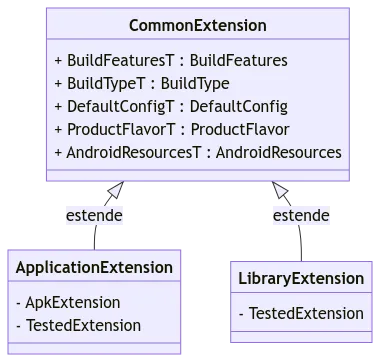
Extracting common decorations using CommonExtensions
1 - Inside the build-logic/decorations/android.kt file, create the following attribute:
import com.android.build.api.dsl.ApplicationExtension
import com.android.build.api.dsl.CommonExtension
import com.android.build.api.dsl.LibraryExtension
import org.gradle.api.Project
import org.gradle.kotlin.dsl.findByType

private val Project.commonExtension: CommonExtension<*, *, *, *, *>
    get() = extensions.findByType<ApplicationExtension>()
        ?: extensions.findByType<LibraryExtension>()
        ?: error("Android plugin not applied")
This function takes care of picking one of the ApplicationExtension or LibraryExtension extensions and uses inheritance to return the CommonExtension<*, *, *, *, *> type.
2 - Let’s create a private fun applyAndroidCommon() function and use our new attribute:
private fun Project.applyAndroidCommon() =
    with(commonExtension) {
      // this is CommonExtension<*, *, *, *, *>
    }
3 - Let’s bring everything that’s shared into this function. The final result looks like this:
private fun Project.applyAndroidCommon() =
    with(commonExtension) {
        namespace = "com.rsicarelli.kplatform"
        compileSdk = 34

        defaultConfig {
            minSdk = 24

            vectorDrawables {
                useSupportLibrary = true
            }
        }

        compileOptions {
            sourceCompatibility = JavaVersion.VERSION_17
            targetCompatibility = JavaVersion.VERSION_17
        }

        applyKotlinOptions()

        buildFeatures {
            compose = true
        }

        composeOptions {
            kotlinCompilerExtensionVersion = libs.version("composeKotlinCompilerExtension")
        }

        packaging {
            resources {
                excludes += "/META-INF/{AL2.0,LGPL2.1}"
            }
        }
    }
4 - Let’s update our applyAndroidApp(), keeping the ApplicationExtension-specific settings, like applicationId, etc:
internal fun Project.applyAndroidApp() {
    applyAndroidCommon()

    extensions.configure<ApplicationExtension> {
        defaultConfig {
            applicationId = "com.rsicarelli.kplatform"
            targetSdk = 34
            versionCode = 1
            versionName = "1.0"
        }

        buildTypes {
            release {
                isMinifyEnabled = false
                proguardFiles(getDefaultProguardFile("proguard-android-optimize.txt"), "proguard-rules.pro")
            }
        }
    }
}
5 - Let’s do the same with applyAndroidLibrary():
internal fun Project.applyAndroidLibrary() {
    applyAndroidCommon()

    extensions.configure<LibraryExtension> {
        buildTypes {
            release {
                isMinifyEnabled = false
                proguardFiles(getDefaultProguardFile("proguard-android-optimize.txt"), "proguard-rules.pro")
            }
        }
    }
}
Note that the
buildTypesfunction is available onCommonExtensions, but thereleasefunction is not. For now, let’s duplicate this part, which we’ll cover in the next article.
Success!
We took a big step forward by sharing behavior through CommonExtension.